
Download SuperCarousels – AI‑Powered Social Media Carousel Creator
Overview: Why SuperCarousels Is Changing Carousel Creation
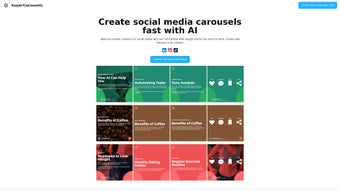
SuperCarousels is a cloud‑based SaaS platform that empowers social‑media marketers, influencers, and content creators to build eye‑catching carousel posts without wrestling with complex design tools. The service leans on artificial intelligence to suggest layouts, color schemes, and typography that match the user’s brand voice, delivering a polished look in seconds. Whether you’re crafting a multi‑slide Instagram story, a LinkedIn carousel, or a TikTok slideshow, SuperCarousels streamlines the workflow from concept to publish‑ready graphics.
The interface is intentionally minimalistic: a drag‑and‑drop canvas, a library of AI‑generated templates, and a real‑time preview window. Because the platform runs entirely in the browser, there’s no heavy software to install, and updates are pushed automatically, guaranteeing that you always have the latest features and security patches. Another standout advantage is that SuperCarousels removes the barrier of credit‑card requirements for the trial phase, allowing users to explore the full set of tools risk‑free. This approach aligns with the growing demand for secure, free‑to‑test software that respects user privacy while delivering professional results.
In addition to speed, consistency is a core promise. The AI engine analyses your existing brand assets—logos, color palettes, and preferred fonts—to ensure every carousel slide adheres to a cohesive visual identity. This eliminates the “design drift” that often occurs when multiple team members create content in isolation. For agencies handling dozens of client accounts, SuperCarousels offers a centralized dashboard to manage permissions, schedule releases, and track performance metrics across platforms.
Overall, SuperCarousels positions itself as a time‑saving, cost‑effective solution that bridges the gap between high‑quality design and everyday usability. It is especially valuable for professionals juggling tight deadlines and for hobbyists who want to elevate their social presence without a steep learning curve. The platform also integrates analytics that show engagement rates per carousel, enabling data‑driven refinements for future campaigns.
Key Features & Compatibility
- AI‑Driven Template Engine: Generates carousel layouts based on your input text, images, and brand guidelines.
- Drag‑and‑Drop Canvas: Simple visual editor that lets you rearrange elements, add icons, and adjust spacing with a few clicks.
- Brand Consistency Tools: Upload logos, set primary/secondary colors, and choose fonts to lock the visual language across all slides.
- Multi‑Platform Export: One‑click export for Instagram (1080 × 1080 px), LinkedIn (1080 × 1350 px), Facebook, and TikTok carousel formats.
- Real‑Time Collaboration: Invite teammates, assign roles, and leave comments directly on the canvas.
- Cloud‑Based Library: Access a growing collection of royalty‑free images, icons, and animations curated for social media.
- Scheduled Publishing Integration: Connect with popular schedulers (Buffer, Hootsuite) to auto‑post finished carousels.
- Secure Data Handling: End‑to‑end encryption, GDPR compliance, and automatic backups.
Compatibility: Because SuperCarousels lives in the browser, it works seamlessly on Windows 10/11, macOS Monterey and later, as well as Chrome OS. Mobile users on Android 9+ or iOS 13+ can also access the full editor via Safari or Chrome, though the desktop experience remains optimal for detailed design work.
The platform supports all major browsers—including Chrome, Firefox, Edge, and Safari—ensuring a consistent experience regardless of your preferred environment. For teams that enforce strict IT policies, SuperCarousels can be whitelisted as a trusted SaaS application, and single sign‑on (SSO) via SAML or OAuth is available on the Enterprise plan.
From a performance perspective, the AI engine runs on remote servers, meaning your local machine only handles the UI rendering. This results in fast load times even on modest hardware, and the heavy lifting is offloaded to secure cloud infrastructure that scales with demand. Users also benefit from automatic versioning, so previous design iterations can be restored if needed.
Getting Started: Installation, Setup, and Daily Use
1. Account Creation – No Credit Card Required
Visit SuperCarousels.com and click the “Start Free Trial” button. You’ll be prompted to enter an email address and create a password. Because no payment information is needed, you can begin experimenting immediately. After confirming your email, you’ll land on the dashboard where the onboarding wizard walks you through the basics, including a short video tour that highlights key UI elements.
2. Upload Your Brand Assets
From the “Brand Settings” tab, upload your logo (SVG or PNG), define your primary and secondary colors using HEX codes, and select the fonts you regularly use. The AI will store these preferences and automatically apply them to any new carousel you generate, guaranteeing brand consistency across posts. You can also set up multiple brand profiles if you manage work for several clients, making it easy to switch contexts with a single click.
3. Creating Your First Carousel
- Click “New Carousel” and choose a template category (e.g., “Product Launch,” “Educational Series,” or “Storytelling”).
- Enter a brief description of the carousel’s purpose. The AI suggests a slide structure, recommended image placements, and copy snippets.
- Drag your own images into the placeholders or pick from the built‑in royalty‑free library.
- Fine‑tune text, adjust line spacing, and add icons or call‑to‑action buttons. Real‑time preview shows exactly how the carousel will appear on each platform.
- When satisfied, click “Export.” Choose the desired format (Instagram, LinkedIn, etc.) and download a ZIP file containing PNGs or a ready‑to‑upload PDF.
4. Publishing and Scheduling
If you use a social‑media scheduler, enable the integration from the “Connections” page. Authenticate your Buffer, Hootsuite, or Later account, then map each carousel export to a scheduled post. SuperCarousels will push the assets directly, eliminating the manual upload step. You can also set up publishing queues that automatically rotate carousel variations for A/B testing.
5. Ongoing Updates and Support
All updates are applied automatically; you’ll never need to download a new version. The platform also offers a live chat support widget and a comprehensive knowledge base that covers everything from AI template customization to API usage for enterprise customers. For larger teams, a dedicated account manager is available to assist with onboarding, workflow automation, and custom branding requirements.
Pros, Cons, Frequently Asked Questions & Conclusion
Pros
- AI‑generated designs speed up creation by up to 70%.
- Intuitive drag‑and‑drop UI requires no prior design expertise.
- Free trial without credit‑card; transparent pricing for paid plans.
- Consistent branding enforced through saved brand assets.
- Cross‑platform export options cover all major social networks.
- Secure cloud storage with GDPR compliance and end‑to‑end encryption.
- Real‑time collaboration reduces hand‑off delays for teams.
- Built‑in analytics help you track carousel performance.
Cons
- Limited offline functionality; an internet connection is required.
- Advanced animation effects are only available on higher‑tier plans.
- Custom font uploads are restricted to licensed web‑fonts.
- Some users may find the AI suggestions need manual tweaking for niche industries.
FAQ
Can I use SuperCarousels on a mobile device?
Yes, the web app is fully responsive and works on Android 9+ and iOS 13+. While the desktop interface offers the most screen real estate for design, you can create, edit, and export carousels directly from your phone’s browser.
Is there a limit to how many carousels I can create on the free plan?
The free tier allows up to 20 carousel projects per month, which is ample for most individual creators. If you need unlimited projects, the Pro plan removes this restriction.
Do I need any design software installed locally?
No. SuperCarousels is a cloud‑based service, so all design work happens in the browser. This eliminates the need for Photoshop, Illustrator, or any other desktop design suite.
How does the AI ensure my brand’s visual identity stays consistent?
When you upload your logo, color palette, and preferred fonts, the AI stores these preferences and automatically applies them to every new template. It also flags any deviations and suggests adjustments to keep the design on‑brand.
What payment methods are accepted for the paid plans?
SuperCarousels accepts major credit cards (Visa, MasterCard, Amex), PayPal, and bank transfers for Enterprise customers. All transactions are processed over a secure SSL connection.
Conclusion & Call to Action
SuperCarousels bridges the gap between high‑quality design and everyday usability, making it an essential tool for anyone serious about elevating their social‑media presence. By harnessing AI, the platform cuts down production time dramatically while safeguarding brand consistency—a combination that few competitors can match. Whether you’re a solo influencer, a marketing agency, or a small business owner, the free trial lets you explore the full feature set without financial commitment.
Ready to transform your carousel workflow? Start your free trial today and experience the speed, security, and creativity that only SuperCarousels can deliver. Your next viral carousel is just a few clicks away.



.png)



